Accounts and the ledger
Underneath the friendly screens is ordinary double-entry bookkeeping. You never have to look at it, but it's there, and it ties.
The chart of accounts
Books → Accounts is the list of buckets your money is sorted into, grouped into assets, liabilities, equity, income, and expenses. You start with a chart suited to your kind of business and can add accounts as you need them. Numbering follows the usual convention, which is what makes an export legible to any accountant who has never heard of us.
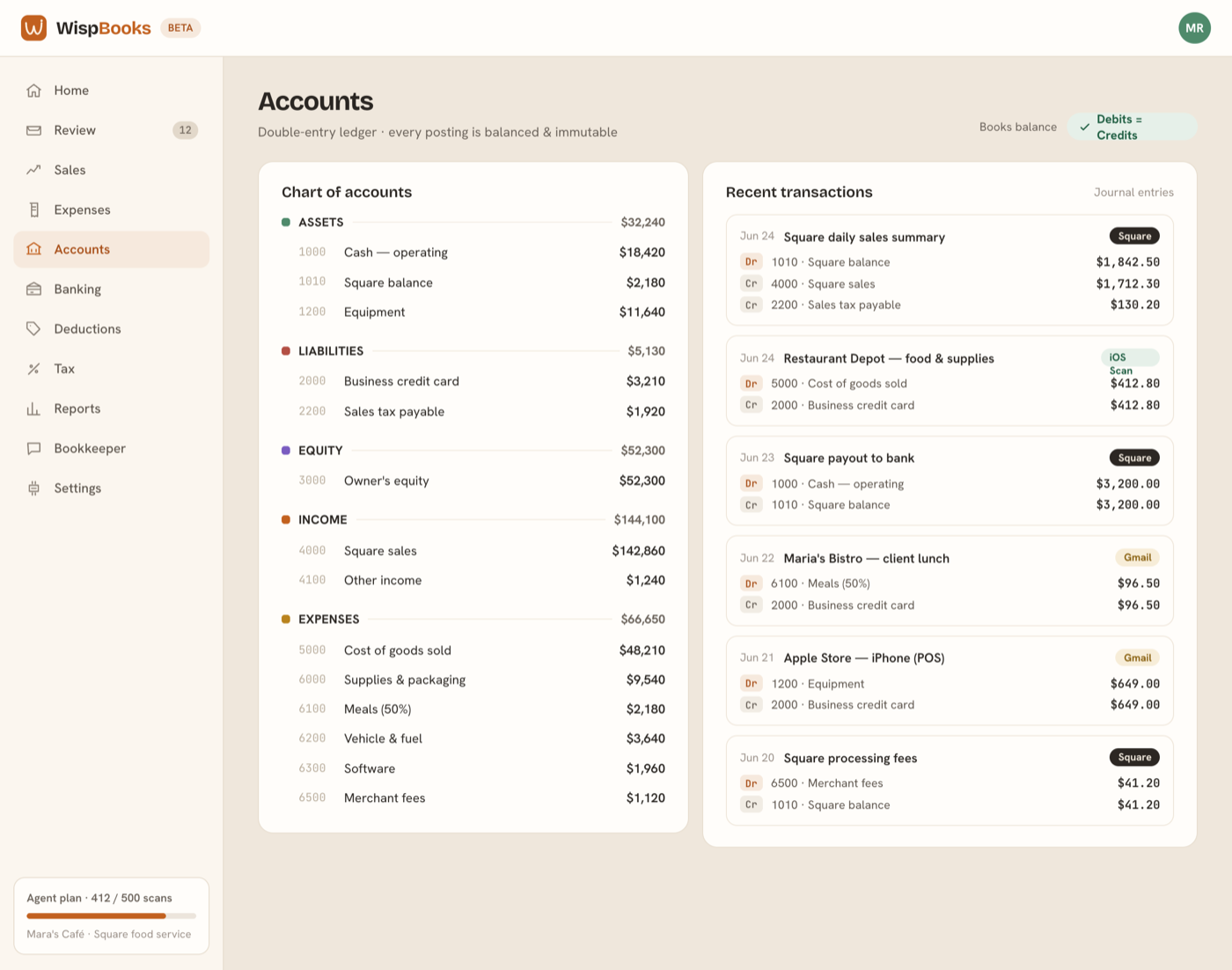
What a journal entry looks like
Every approved expense posts at least two lines: a debit to an expense or asset account, and a credit to whatever paid for it. Debits equal credits on every entry, without exception — an entry that doesn't balance can't post. Click any account to see the entries behind its balance, and any entry to see the receipt, bank line, or Square day that produced it.
Where entries come from
- Receipts you approved, with the image attached.
- Bank lines you categorized, tied to the transaction they came from.
- Square sales, tax, fees, and payouts, posted by the sync rather than by hand.
- Manual entries you or your bookkeeper wrote, for the things software can't see.
Corrections
A miscategorized bank line is re-filed in one tap — pick the right account and WispBooks takes care of putting the ledger right. What it never does is quietly rewrite history: every change is recorded in the audit log with who made it and when, and the evidence behind the entry stays attached. Books that can be silently altered aren't evidence of anything.
Closing a month
Books → Month close walks a review checklist first — unreviewed receipts, unmatched bank lines, suspected duplicates, possible assets — separating blockers from advisories and deep-linking each one to where it gets fixed. When the month is clean, lock it. Locked periods reject new entries, so a late receipt lands in the current period instead of quietly changing a number your accountant already used, and corrections that must reach a closed month post as adjusting entries.